Crypto Trading · lesson 9 of 29
Wallets, Keys, and Seed Phrases Explained
Learn this in a 5-minute interactive lesson
Real charts and practice questions. Free, no sign-up needed.
A wallet doesn't hold coins
Your coins don't live inside your wallet. They live on the blockchain. A wallet holds the private keys that prove you own an address and let you move what's there. Lose the keys, and the coins are still on the blockchain, but nobody can ever move them again. People believe millions of bitcoin are lost this way forever, including one man in Wales who has spent years trying to get permission to dig through a rubbish dump for a hard drive he threw away.
Three ways to hold crypto
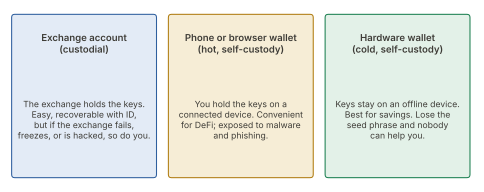
- Custodial (exchange) wallets: the exchange holds the keys. Easy, and if you forget your password you can recover the account with ID. But you're trusting the company.
- Hot wallets: apps on your phone or browser, such as MetaMask, Trust Wallet, Phantom, or Rabby. You hold the keys, which are stored on a device connected to the internet. Great for DeFi and small amounts, but exposed to malware and phishing.
- Cold wallets (hardware wallets): small devices, such as those made by Ledger and Trezor, that keep your keys offline. To send anything, you have to approve it on the device itself. They're the best option for savings you won't touch often.
The seed phrase
When you create a self-custody wallet, it shows you a seed phrase (also called a recovery phrase): 12 or 24 ordinary words in a set order. Those words are your wallet. Anyone who has them can recreate your wallet on any device and take everything. If you lose your phone but have the words, you can get it all back. If you lose the words and your phone, it's gone forever.
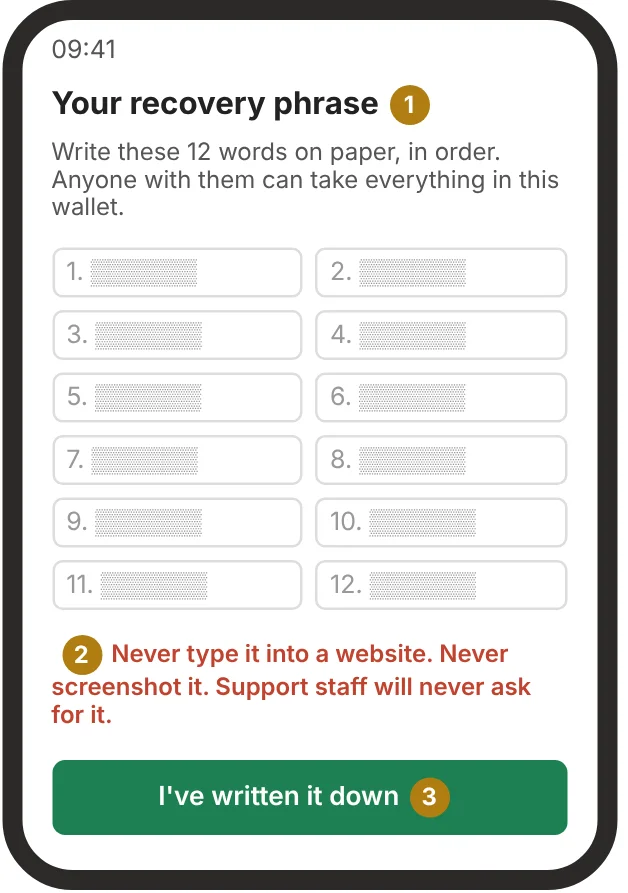
- 1.Download the wallet only from its official website or your phone's official app store, and check the developer's name. Fake wallet apps exist and look very convincing.
- 2.Choose Create a new wallet, and set a strong password or PIN for the app.
- 3.When the seed phrase appears, make sure nobody can see your screen, and write the words on paper, in order, with the numbers. Check every word twice.
- 4.Never take a screenshot, photograph it, copy it into a notes app, email it to yourself, or save it to cloud storage. Hackers search for exactly those things.
- 5.The wallet will ask you to confirm some of the words. Do it carefully.
- 6.Store the paper somewhere safe and private. Many people keep a second copy in a different place, or engrave the words on a metal backup plate that survives fire and floods.
- 7.Test the backup: send a tiny amount to the wallet, delete the app, reinstall it, and restore from your words. If the tiny amount is there, your backup works.
The golden rules
- Nobody genuine will ever ask for your seed phrase. Not the wallet company, not an exchange, not "support," not a "validator" helping you fix a "sync error." Anyone who asks is trying to rob you.
- Never type your seed phrase into a website. The only time you should ever type it is when restoring your own wallet in the official app.
- Buy hardware wallets only from the manufacturer or an official reseller. Never buy one second-hand, and never use one that arrives with a seed phrase already printed in the box.
- Keep your holdings private. There have been a growing number of robberies and kidnappings targeting people known to hold a lot of crypto. Don't post your balances online.
- Make a plan for your family. If something happened to you, could someone you trust find and use your backup? Many people leave sealed instructions with a lawyer or a trusted relative.
Where should your crypto live?
A sensible setup for most people: keep what you're actively trading on the exchange, a small amount for DeFi experiments in a hot wallet, and anything you plan to hold for a long time in a hardware wallet. Think of it like a wallet, a current account, and a safe.
Kevin saved his seed phrase in a note on his phone titled "SEED PHRASE DO NOT OPEN." His phone backed up its notes to the cloud automatically. His cloud account was reused-password-hacked, and his wallet was emptied within an hour. Malware and hackers search specifically for words like "seed," "wallet," and "recovery." Paper doesn't get hacked.
Key terms from this lesson
- Wallet
- software or a device that holds the private keys to your crypto.
- Custodial wallet
- a wallet where someone else, such as an exchange, holds the keys.
- Self-custody
- holding your own private keys.
- Hot wallet
- a self-custody wallet on an internet-connected device.
- Cold (hardware) wallet
- a device that keeps private keys offline.
- Seed (recovery) phrase
- 12 or 24 words that can recreate a wallet and its keys.
Learn this in a 5-minute interactive lesson
Real charts and practice questions. Free, no sign-up needed.
Related guides
Pajama Markets provides education, not financial advice. Trading forex, crypto and leveraged products carries a high risk of losing money. Practise on a demo account first.